
What You Are Learning
By the end of this lesson you will be able to say in plain words what a revision is on a construction project and how it differs from the first issue of a drawing. You will be able to find a revision on a plan sheet by looking for three connected marks: the revision cloud, the revision delta or triangle, and the revision table in or near the title block. You will be able to explain what each mark tells you and why the three need to agree. You will be able to tell a revision apart from three things it is often confused with: an addendum, a request for information, and a field note or redline markup. You will also be able to describe what happens to the old version when a revision is issued, what the word superseded means, and why building from a superseded sheet is one of the most preventable errors on a fiber job.
One boundary runs through the whole lesson. Reading a revision teaches you to recognize that a document changed and to check that you hold the current version. It does not qualify you to issue a revision, approve a design change, or perform regulated or hazardous work. Only the people the project names for that role can authorize and issue changes to the construction information.
Start With the Basics
A construction print is the issued drawing set that shows what will be built, where it will be built, and how the parts fit together. Earlier lessons in this level taught you to read a single sheet: its title block, its legend, its symbols, its notes, and its details. The title block is the framed panel on the sheet, usually in the lower right corner, that identifies the sheet by its number, its title, its project, and its current revision. That last field, the revision, is the subject of this lesson.
Designs change after they are first issued. A utility is found where no utility was shown. A property owner grants an easement in a slightly different place. A road authority requires a crossing to move. A note was wrong. When that happens, the design team does not quietly edit the file and hope everyone notices. On a controlled project, the change is issued as a revision: a new, recorded version of the affected sheet or document that replaces the earlier version and carries marks showing what changed, when it changed, and under what authority.
Three definitions need to be clear before anything else builds on them.
First, document control is the discipline of tracking each version of a drawing or document so that everyone works from the current version and older versions stay on the record without being mistaken for current work. A drawing register is the master list for a project that records each drawing number, its title, and its current revision in one controlled place.
Second, a transmittal is the formal, recorded issue of controlled drawings or documents to another party, usually with a cover list naming every file or sheet sent and the revision of each one. The transmittal is how a revision reaches the field in a traceable way, instead of by a loose forward with no record.
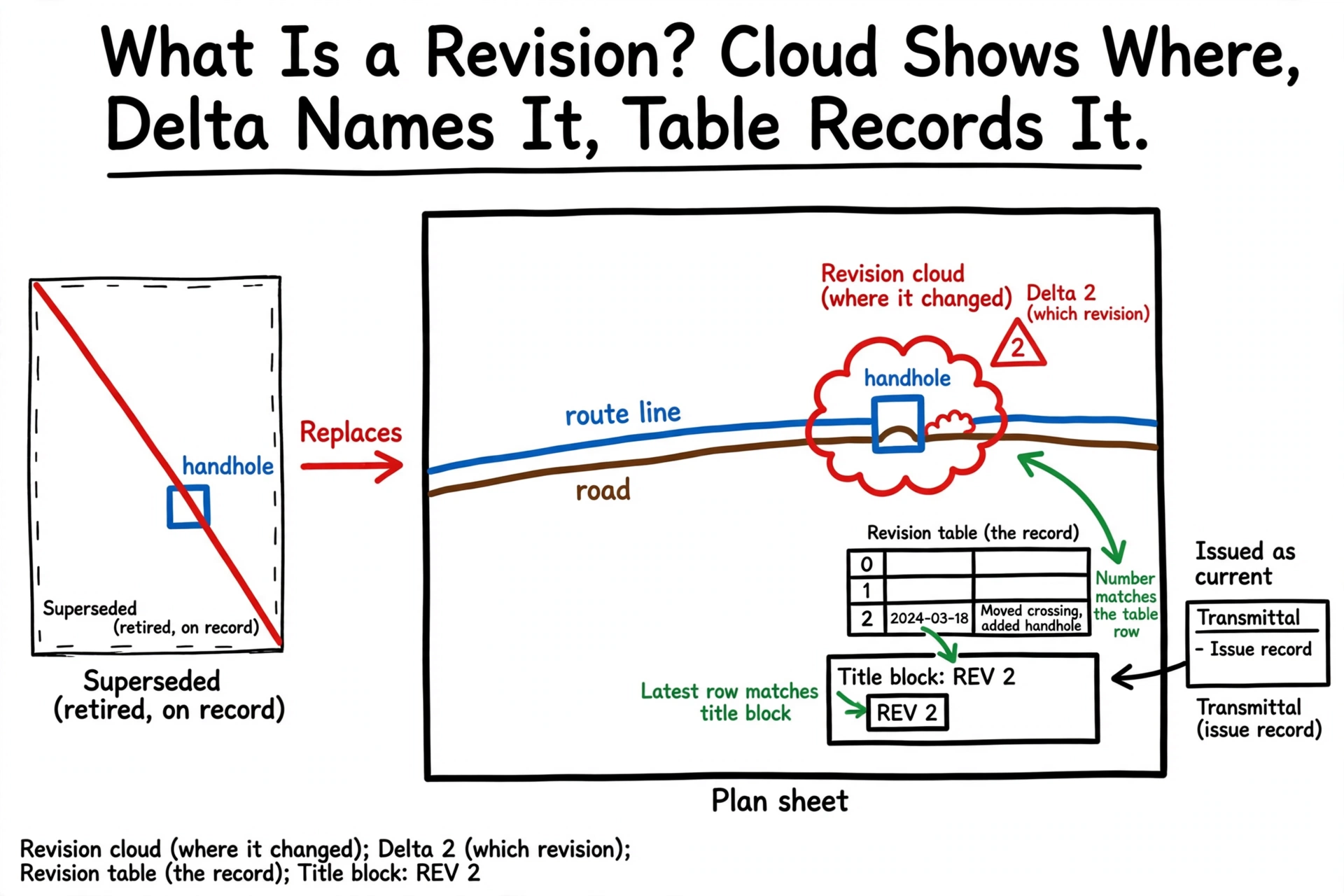
Third, superseded means replaced by a newer version and retired from use, but kept on the record. A superseded sheet is not current instruction. It is history. Good document control marks it, files it separately, or stamps it so that nobody picks it up by mistake and builds from it.
Hold one sentence from this section, because the rest of the lesson returns to it. A revision is not just a changed drawing. It is a changed drawing issued through a controlled process, with marks that let any reader prove what changed and prove that the sheet in hand is the current one.
What Is It?
A revision is a formal change to an issued construction document, most often a plan sheet, that is recorded, marked on the document itself, and issued as the new current version of that document. The sheet number and title usually stay the same. The revision identifier changes. That identifier is commonly a number or a letter, depending on the owner, the design firm, and the project standard. Some projects use letters for early or preliminary issues and numbers once a sheet is issued for construction. Other projects use numbers throughout, or letters throughout. There is no single universal scheme for fiber work, so you must read the scheme the project in front of you actually uses and never assume that Revision 2 on one job means the same stage as Revision 2 on another job.
A revision can be small or large. It can correct one note, move one handhole, add one detail, or redraw a whole segment. The size of the change does not decide whether it counts as a revision. The controlled issue does. If the design team changes the governing document and issues a new version of it as current, that new version is a revision, whether it changed one line or one hundred lines.
A revision usually carries three connected parts, and a complete revision has all three.
The first part is the change itself, drawn or written into the sheet content: the moved route line, the new structure, the corrected note, the revised detail.
The second part is the marking that points at the change, so a reader does not have to compare two versions line by line to find it. That marking is the revision cloud with its delta, covered in detail in the next section.
The third part is the record: a new row in the revision table that gives the revision identifier, the date, a short description of what changed, and, on many projects, who approved it or which document authorized it. Engineering drawing practice recorded in ASME Y14.35, the standard for revision of engineering drawings and associated documents, follows this same record pattern, using a revision letter identified in the revision history block, dated, described, and tied to the change document that authorized it. Construction plan sets adapt that record idea to the title block area of the sheet, and many of them use numbers or a mix of letters and numbers under the owner or project standard.
A revision is not the same as a markup. A redline markup is an annotation layered over a drawing to flag an error, show what was actually built, or request a change. Field crews and inspectors commonly redline a print during the work. A redline is an input. It can trigger a revision, and at the end of a job redlines are often used to produce the record drawings that show what was built. But a redline by itself does not revise the issued drawing. The issued drawing changes only when the responsible design party revises and reissues it through the project process.
A revision is also not a new project and not a new sheet, unless the change is so large that the owner or designer chooses to issue additional sheets. New sheets added to a set get their own sheet numbers. How their revision history starts is set by the project standard, so read the new sheet title block and revision table as issued instead of assuming a starting identifier. Existing sheets that change keep their numbers and gain a new revision row. That is why two sheets in the same set can legitimately show different current revisions on the same day: each sheet is revised only when its own content changes.
What Does It Look Like?
You recognize a revision by looking in three places on the sheet, in this order: the title block, the revision table, and the drawing area itself.
Start with the title block. It states the current revision of that sheet, often in a small box labeled REV or Revision. That single identifier is the sheet claim about itself. If you check nothing else, check that box every time you pick up a sheet, because it is a quick check and it catches a common and preventable error, which is holding an old print without knowing it.
Next, find the revision table, also called the revision block or revision history block. On many plan sheets it sits directly above or beside the title block. Each row is one revision. A typical row has four pieces of information: the revision identifier, a short description of the change, the date, and the initials or name of the person who made or approved it. Read the latest row and compare its identifier with the title block. The two must match. The revision history block guidance is explicit on this point: the revision shown in the title block should be the same as the latest entry in the revision block, and if they disagree, the drawing contradicts itself and that disagreement is worth raising before anything is built from it. Read the description in words, not just the number. A useful description names the change itself, for example a route moved, a structure added, or a note corrected. A vague description such as updated or revised tells you a change happened without telling you what it was, and you will have to find the change from the clouds alone.
Then look in the drawing area for the revision cloud and the delta. A revision cloud is a wavy, scalloped loop drawn around the area that changed. Its job is to pull your eye straight to the changed region so you do not have to hunt for it. A revision delta, also called a revision triangle, is a small triangle containing the revision number or letter, placed touching, inside, or next to the cloud and often connected to it by a short leader. The triangle takes its name and shape from the Greek letter delta, which in engineering is used to mean change. The cloud says where something changed. The delta says which revision that change belongs to, and that number points you back to the matching row in the revision table with its date and description. The pairing matters. A cloud with no delta is a change nobody can look up. A delta with no cloud is a record with no location.
Expect older clouds to be handled in one of two ways, depending on project standard. On many sets, when a new revision is issued, the clouds from the prior revision are removed so that only the latest changes are clouded, while the deltas and the table rows remain as the running history. On other sets, clouds remain layered by revision. Either way, the revision table is the complete history. The clouds on the face of the sheet are a finding aid for the most recent change, not the full record.
A revised sheet can also reach you as a full reissue of the whole set, as a single replacement sheet, or as part of a revision package with a memo or transmittal that narrates the changes. State transportation practice gives a clear example of the package form: the Florida Department of Transportation design manual describes plan revisions processed with a revision memo, approvals, and reissued plans, specifications, and quantities when pay items are affected, and Missouri practice similarly routes plan changes after advertisement through a formal submittal and revision process. Fiber owners and design firms use lighter versions of the same idea. Whatever the package shape, your check is the same: the memo or transmittal names the sheets and revisions it sends, and each sheet you receive should match that list.
What a revision does not look like is a hand correction with no record. A pencil change on one paper copy, a verbal instruction at the tailgate, or a texted photo of a marked up sheet may all communicate useful information, but none of them carries a new revision identifier, a table row, or a transmittal. Treat them as information to reconcile through the project process, never as a revised sheet.
What Does It Do?
A revision does four jobs on a project.
First, it changes the instruction in a controlled way. After a revision is issued, the revised sheet is the instruction for that part of the work. It replaces the earlier instruction completely for that sheet. Crews do not build half from the old sheet and half from the new one. The new version governs the whole sheet, including the parts that did not change, because only the new version is current.
Second, it makes the change findable. Without clouds, deltas, and a table, every reader would have to compare the new sheet against the old sheet line by line to learn what changed, and some readers would miss the change entirely. The marking system turns a search problem into a reading task: follow the delta number to the cloud, read what is inside the cloud, then read the table row for the date and the reason in brief.
Third, it creates the record that later questions depend on. Months later, an inspector, an owner, or a crew fixing damage may need to know which version of a sheet was current on the day a segment was built, and what changed between versions and why. The revision table, the transmittals, and the drawing register together answer that question. That record also supports payment and closeout, because quantities and pay items that change with a revision can be traced to the revision that changed them.
Fourth, it keeps every party on the same version. A revision issued through document control goes to the whole distribution list for that document, not just to the person who asked a question. That shared issue is the point. It prevents the silent split where the office prices, permits, or inspects from one version while the field builds from another.
A revision does not do three other jobs, and confusing them causes real disputes. It does not answer a question by itself. A question is handled by the request for information process described in the next section, and a revision may or may not follow from the answer. It does not authorize extra payment by itself in every contract. Whether a revision changes the contract price, the schedule, or neither depends on the contract and on whether a formal contract modification such as a change order also issues. Read a revision as a change to the construction information. Read the contract documents and any accompanying modification to learn its commercial effect, and verify that effect through the project process instead of assuming it. And it does not fix a stale set by itself. Issuing a revision only helps if the superseded copies are actually pulled, marked, or set aside wherever prints live: the truck, the trailer, the field tablet, and the shared folder.
Where Does It Fit?
A revision sits inside a family of change and clarification tools. Placing it correctly among its neighbors is the heart of this lesson, because the field often uses the words loosely while the project record treats them as different things.
An addendum, plural addenda, is a formal written or graphic modification issued during the bidding phase, after the bid documents go out and before the contract is signed. That timing is what defines it. An addendum clarifies, corrects, adds to, or deletes from the bid documents, is sent to every prospective bidder at the same time, is numbered in sequence, and becomes part of the contract documents. Bidders are commonly required to acknowledge receipt of each addendum on the bid form. A revised sheet issued inside an addendum is still a revised sheet, and it is commonly clouded and delta marked. The delta number ties the change to the revision record for that issue. What the number stands for is set by the issuing agency or project standard, so read it against the addendum and the revision block instead of assuming it is the addendum number. The difference is the stage: before award, changes travel as addenda. After the documents are issued for construction, changes to those issued documents travel as revisions, usually with whatever contract modification the project requires.
A request for information, usually shortened to RFI, is a formal question raised during construction to resolve a gap, a conflict, or an unclear point in the contract documents. Under the widely used AIA A201 general conditions framework, an RFI asks for a clarification or interpretation. An RFI response clarifies the documents. By itself, it does not change them. If the clarification shows that a change is needed, that change is then made through a modification, which on the drawing side appears as a revision. The practical rule is simple. An RFI asks. A revision changes. Never treat an RFI answer that describes different work as if the sheet had already been revised. Ask how the change will be issued and wait for the revision if the sheet itself must change.
A change order and a construction change directive are contract modification tools in the AIA framework, but they work differently. A change order is agreed and signed, and it adjusts the contract sum, the contract time, or both. A construction change directive orders the changed work to proceed before the sum or time adjustment is agreed, and that adjustment is settled later, normally by a change order. They often travel with revised sheets, but they are not the same thing as the revised sheet. The sheet shows the new work. The modification settles the contract terms for that new work. A field reader does not need to settle those terms, but does need to know that a clouded sheet and a settled contract change are two separate pieces of paper, and the absence of one does not cancel the other.
A field change or field instruction, where a project uses one, is a limited instruction issued under rules the project sets in advance. Its authority, its dollar or scope limits, and how it is later folded into a revision of the record documents all come from that project documents, not from general practice. If your project has no such process in writing, do not invent one. Route the change as a question and let the revision process carry it.
Upstream of a revision are its triggers: a design error or omission found in review, an RFI answer that requires a drawing change, a field condition that differs from what the documents showed, a permit or authority requirement, an owner directed change, or a material or method substitution the owner accepts. Downstream of a revision are its effects: updated quantities, updated permit sets where the permit holder requires them, updated inspection references, and, at the end of the job, record drawings that start from the final revised set plus the field redlines.
In the life of a single sheet, the sequence is steady. The sheet is first issued. It is revised one or more times as changes are authorized, each time gaining a cloud, a delta, and a table row. Superseded versions are retired to the record. The final revised version, corrected by the as built record process the project requires, becomes part of the closeout record of what was authorized and, with the redlines, what was built.
Why Does It Matter?
It matters because fiber construction is built from paper and files before it is built in the ground, and a revision is the only reliable signal that the paper changed. A moved bore crossing, a relocated handhole, or a changed splice point exists first as a revision. The crew that never receives it, or receives it and never notices it, will build the old design correctly and still be wrong.
It matters because the cost of the error is out of proportion to the cost of the check. Checking a revision identifier against the register or the transmittal is a quick check. Rebuilding a segment placed from a superseded sheet can mean removing placed conduit or structures, restoring ground twice, re-permitting a crossing, and arguing over who pays for work that was built exactly as an old sheet showed. Document control exists because that trade is so one sided.
It matters because revisions protect the reader who checks. When a disagreement arises later about what was authorized on a given date, the worker or inspector who can point to the revision that was current, the transmittal that delivered it, and the table row that described the change has a record. The worker who built from an unmarked copy found in the truck has only a memory. Projects run on records.
It matters because small revisions hide inside familiar sheets. A reissued sheet looks almost identical to the one it replaces. The route is in the same place on the page, the title is the same, and the sheet number is the same. Only the revision box, the table, and the clouds announce that one crossing, one note, or one structure changed. A reader who flips past the title block because the sheet looks familiar is exposed to exactly the change the revision system was built to flag.
It also matters for coordination beyond one crew. Locators, inspectors, permit holders, splicers, and restoration crews all work from the same sheet at different times. A revision that reaches the placing crew but not the inspector produces a false deficiency. A revision that reaches the office but not the splicing crew produces a splice built to a superseded layout. Controlled issue to the full distribution, and a personal habit of checking the revision before relying on the sheet, are what keep those parties describing the same job.
What Does Good Look Like?
Good revision practice, and good use of a revision, look like this.
The sheet identifies its revision consistently. The identifier in the title block, the latest row in the revision table, the delta numbers on the face of the sheet, and the entry in the drawing register all agree. Any disagreement among those four is treated as a document problem to resolve before building, not as a detail to overlook.
Every change is clouded and tagged. Each changed area has a cloud, each cloud has a delta, and each delta number has a matching table row with a date and a description that names the change in plain words. A reader can move from the table to the drawing and from the drawing back to the table without guessing.
The revision is issued with a record. A transmittal or revision memo lists the sheets sent, the revision of each, and a short narrative of what changed and why. The receiver can file that record, compare it against the sheets in hand, and prove later which version was current on which date.
Superseded copies are controlled. When the new sheet arrives, the old paper copy is removed from the working set, marked superseded, or destroyed under the project rule, and the old file is moved out of the current folder or renamed under the project naming rule. No working location keeps two current looking versions side by side.
Distribution is complete. The revision goes to everyone on the document distribution list: field crews, inspectors, the permit file where required, and any subcontractor whose work the sheet touches. The sender does not assume that forwarding to one person reaches the rest.
Your own use is disciplined. Before you build, inspect, measure, or quote from a sheet, you read its revision identifier out loud or write it down, and you compare it with the register, the latest transmittal, or the current set issued to you. When you find a cloud, you read the changed content inside it fully, including any note it surrounds, because the cloud marks the place where your old knowledge of that sheet just expired. When the copy you hold does not match the current revision, you stop and get the current sheet through the project process instead of building and hoping.
What Can Go Wrong?
The superseded sheet error is the signature revision failure. A new revision is issued to the office or to a shared folder. The paper set in the truck is never swapped. The crew builds a crossing, a structure location, or a segment exactly as the old sheet showed, and the error surfaces only when the inspector works from the current sheet or when the new work conflicts with something already revised. The defense is unglamorous: swap the set when a revision arrives, mark the old one on the spot, and check the revision box at the start of work, not after placement.
The cloud without a record error happens when a sheet is reissued with clouds but no new table row, no new identifier, or no transmittal. Readers can see that something changed but cannot prove which version they hold or when it was issued, and two slightly different copies can both claim to be the changed sheet. A change without the record half of a revision is only half controlled. Raise it and ask for the revision to be completed and reissued properly.
The delta mismatch error happens when the delta number beside a cloud does not match any table row, or the latest table row has no cloud anywhere on the sheet. The first case points to a marking mistake. The second case has more than one possible cause, and the sheet alone does not prove which one it is. Treat any table row with no matching cloud as a question to raise through the project process before relying on the sheet. Either mismatch deserves a question before reliance, because the marking system only protects you when its parts agree.
The partial set error happens when a revision replaces some sheets of a segment and a reader files the new sheets behind the old sheets, or replaces the plan view but not the profile or detail sheet that the same change also revised. The set now mixes versions that were never issued together, and a crossing can show in its old place on one sheet and its new place on another. File a revision as a set operation: read the transmittal list, pull every sheet it names, and confirm every named sheet in hand carries the stated revision.
The RFI as revision error happens when a crew treats an RFI answer, a meeting note, or an email as if it revised the sheet, builds the described change, and later learns that the priced, permitted, or inspected work is still the work on the unrevised sheet. Clarifications explain the documents. Revisions change them. When an answer describes work that differs from the sheet, ask how and when the sheet will be revised, and who is authorizing the contract change, before building the difference.
The silent specification revision error happens when attention goes only to the drawings. Specifications, notes pages, and standard detail sheets are revised too, and a specification revision can change a material, a method, or a testing requirement without moving a single line on the plan view. Check the revision of every document you rely on, not only the drawing, and read transmittals for specification sections as carefully as for sheets.
The as built confusion error happens at closeout, when a field redlined print is mistaken for a revised issued sheet. The redline records what the field reports was built. The revised sheet records what the design authority issued. Record drawings combine the two through the project closeout process. Handing over a redline as if it were an issued revision, or building new work from a redline, mixes two records that must stay distinct until that process joins them.
What Should Someone Notice in the Field?
You will meet revisions at the start of a job, in the middle of a segment, and whenever a package arrives in the truck or the inbox. Work through these checks in order.
First, check the revision before the content. Every time you pick up a sheet you are about to rely on, read the revision identifier in the title block first, before you study the route or the details. Compare it with the latest transmittal you received, the drawing register if you have access to it, or the supervisor copy of the current set. Make this the same automatic habit as checking the sheet number and title. A sheet with the wrong revision is the wrong sheet, however familiar it looks.
Second, read the revision table, latest row first. Note the date and read the description in full. Ask yourself whether the description matches work you are about to do. If the latest revision moved a crossing, added a structure, or corrected a note in your segment, that row is now part of your instructions, and you need to see the clouded change itself before you proceed.
Third, find every cloud on the sheet and read inside it. Follow each delta number back to its table row so you know which revision each cloud belongs to. Read the changed line, structure, or note completely. Pay special attention to clouded notes: a single corrected word in a construction note can change a method, a material, or a restoration requirement for the whole segment.
Fourth, sweep your own set for superseded copies. Look in the truck set, the trailer set, your tablet or phone files, and any personal folder where prints collect. If you find the same sheet number at two different revisions in working locations, mark the older one superseded, remove it from the working set, and tell the supervisor, because another crew member may hold the same duplicate.
Fifth, watch for revision news in project communications. A revision memo, a transmittal email, or a meeting note announcing revised sheets is a work instruction to update your set, not background reading. When one arrives, act on it the same day: pull the named sheets, file the new ones, mark the old ones, and confirm any sheet the memo names that did not arrive.
Sixth, notice when the ground disagrees with your sheet. Fresh locate marks in a different place, a staked structure offset from the plan, or another crew working from a visibly different sheet are all signals that a revision may exist that you do not hold. Stop and compare revision identifiers with the other party before either of you builds further. Comparing two title blocks settles in seconds what arguing about the work cannot.
Seventh, keep the safety and authority boundary explicit. A revision changes construction information. It does not qualify you for regulated or hazardous work, it does not replace a locate, a permit, or a job safety process, and a cloud around a utility crossing does not make working near that utility your assignment. Recognizing a revision is a reading skill. Acting on the work it shows still requires the qualifications, the locates, and the processes the job requires for that work.
Practical Example
The following example is hypothetical. It is invented to teach the checking habit, and it does not describe a real project, a real company, or real documents.
Hypothetical example: the crossing that moved on paper first. A hypothetical fiber crew is placing buried conduit along a county road. On Monday the crew foreman, Lee, receives a transmittal by email listing three sheets for the segment. Two are unchanged reissues. The third, the plan and profile sheet covering the work front, is listed at a new revision, with a memo line stating that a road crossing was moved to clear a driveway and a handhole was added on the far side of the crossing.
Lee does the set operation before the crew rolls. Lee pulls the old copy of that sheet from the truck set, writes SUPERSEDED across its face, and files it in the record envelope instead of the working set. Lee files the new sheet and reads it in order: revision box first, which matches the transmittal, then the revision table, whose latest row carries the same identifier, the date, and a description naming the moved crossing and the added handhole, then the drawing area, where two clouds appear. The larger cloud surrounds the crossing at its new location beyond the driveway, tagged with a delta carrying the new revision number. The smaller cloud surrounds the added handhole symbol and its label.
At the work front, the inspector, Pat, is working from a paper set Pat picked up the week before. Pat flags the first bore pit location as off plan, because on Pat sheet the crossing still sits at the driveway. Instead of debating positions, Lee and Pat compare title blocks. Pat sheet shows the prior revision. Lee sheet shows the new one, and Lee has the transmittal that issued it. Pat updates the inspection set from the transmittal copy, withdraws the flag, and notes the revision identifier in the inspection record for that day work.
The teaching points are the order and the evidence. The transmittal announced the revision in words. The table recorded it. The cloud and delta showed exactly where it landed on the sheet. The superseded copy was marked the moment the new one arrived, so the only working set on site was current. And when two professionals disagreed in the field, they settled it by comparing revision identifiers and the issue record, not by seniority, volume, or memory. The revision system did its whole job in this hypothetical because each person used the part of it in front of them.
Key Terms
Revision: a formal change to an issued construction document, recorded with a new revision identifier, marked on the document, and issued as the new current version that replaces the earlier version of that document.
Revision identifier: the number or letter that names a specific version of a sheet or document, shown in the title block and in the revision table. The scheme, numbers, letters, or a mix, is set by the project or owner standard and must be read as that project defines it.
Title block: the framed panel on a plan sheet, usually in the lower right corner, that identifies the sheet by number, title, and project, and states its current revision.
Revision table: the record on or near the title block, also called the revision block or revision history block, in which each row gives one revision identifier, a short description of the change, its date, and, on many projects, who approved it or which document authorized it.
Revision cloud: a wavy, scalloped loop drawn around an area of a drawing that changed in a revision. It directs the reader eye to the changed region.
Revision delta: a small triangle containing the revision number or letter, placed at a revision cloud. Also called a revision triangle. The shape comes from the Greek letter delta, used in engineering to mean change. It ties the clouded change to its row in the revision table.
Document control: the discipline of tracking each version of a drawing or document so everyone works from the current version, distribution is recorded, and superseded versions stay on the record without being mistaken for current work.
Drawing register: the master project list of drawings, recording each drawing number, its title, and its current revision in one controlled place.
Transmittal: the formal, recorded issue of controlled documents to another party, with a list naming each document sent and its revision.
Superseded: replaced by a newer version and retired from use, but kept on the record and marked so it is not mistaken for the current document.
Addendum (plural addenda): a formal modification to the bid documents issued during the bidding phase, before the contract is signed, sent to all bidders and becoming part of the contract documents.
Request for information (RFI): a formal question raised during construction to clarify the contract documents. An RFI response clarifies the documents and, by itself, does not change them.
Redline markup: an annotation on a drawing that flags an error, records what was built, or requests a change. A redline is an input to a revision or to the record drawing process. It is not itself an issued revision.
Check Your Understanding
- Name the three connected parts of a complete revision and say what each one does.
- You pick up a sheet whose title block shows Revision 3, but the latest row in its revision table shows Revision 2. What does that disagreement mean and what do you do?
- What is the difference between an addendum and a revision, stated in one sentence about timing?
- An RFI answer describes a handhole in a new location that differs from the location on your sheet. Has your sheet been revised? What do you do next?
- Why is a field redlined print not the same thing as a revised sheet, even when the redline shows the work exactly as built?
Answer key:
- The change itself, drawn or written into the sheet content, is the new instruction. The marking, the revision cloud with its delta, points at the change so a reader can find it without comparing versions line by line. The record, a new row in the revision table with the identifier, date, and description, plus the transmittal that issued it, proves what changed, when, and under what issue, and lets any reader prove the sheet in hand is current.
- The drawing contradicts itself. The revision identifier in the title block must match the latest entry in the revision table, and when they disagree you cannot tell from the sheet alone which is correct. You do not build from it on an assumption. You raise the disagreement through the project process, check the drawing register or the latest transmittal for the true current revision, and get a corrected or confirmed sheet.
- An addendum modifies the bid documents during the bidding phase, before the contract is signed, while a revision modifies documents that have already been issued, including documents issued for construction.
- No. An RFI response clarifies the contract documents and, by itself, does not change them. If the clarified location differs from the sheet, a change is needed, and that change must be issued through the project modification process, which on the drawing side appears as a revision of the sheet. You ask how the change will be issued and who is authorizing it, and you build from the sheet as issued until the revision, and any contract modification the project requires, actually arrives.
- Because the two documents have different authors and different authority. A redline is a field annotation that reports what was built or requests a change. A revised sheet is issued by the responsible design party through document control as the new current instruction. Record drawings join the two through the closeout process. Until then, a redline is evidence and input, not issued instruction, and new work is never built from a redline as if it were a revision.
Lesson Takeaway
A revision is how a construction document changes without losing control of itself. The sheet keeps its number and title, gains a new identifier, marks each change with a cloud and a delta, and records the change in its revision table with a date and a description. The earlier version becomes superseded: retired from use, kept on the record, and marked so nobody builds from it by mistake. Learn to read a sheet in revision order: identifier first, table second, clouds third. Learn to keep the neighbors straight: an addendum changes bid documents before the contract is signed, an RFI asks a question and changes nothing by itself, a redline reports or requests and is not an issue, and a contract modification, not the clouded sheet alone, settles the commercial terms of a change. The whole system asks one cheap habit of you. Before you rely on any sheet, prove it is current. That minute of checking is the difference between building the job that was designed and building the job that used to be designed.
Sources and Technical References
- Archi, Drawing Markup Symbols Explained: revision cloud encircles a changed area, revision delta or triangle is a numbered tag that ties a change to a revision table entry with date, description, and authorisation, and the cloud and delta work as a pair: https://goto.archi/blog/post/drawing-markup-symbols-explained
- CADDManager, CAD Standards, Revision Tracking (2009): clouds encompass the area of revised work, each revision is identified by a revision triangle or delta with a consecutive number placed at the cloud, the title block revision note carries the identifier, date, and a brief description, superseded clouds are frozen while deltas remain as a permanent historical record: https://www.caddmanager.com/CMB/2009/11/cad-standards-revision-tracking/
- SpecCapture, Revision History Blocks on Engineering Drawings, Explained: revision history block columns for revision, description, date, and approval under ASME Y14.35 and ASME Y14.1, the revision letter in a triangle or circle beside the changed feature, the authorizing change document number tying the revision to its paperwork, and the rule that the title block revision and the latest revision block entry must agree: https://speccapture.com/guides/revision-history/
- Lunr, Document Control Glossary: plain definitions used and adapted in this lesson for transmittal, drawing register, revision control, title block, redline markup, issued for construction, superseded drawings, controlled document, and request for information: https://www.lunr.app/glossary
- MeltPlan, Addenda in Construction, Definition, Purpose, and How to Manage Them: an addendum is a formal modification issued during the bidding phase before the contract is signed, is legally binding and becomes part of the contract documents, is sent to every bidder, is sequentially numbered, and is acknowledged by bidders: https://www.meltplan.com/blogs/addenda-in-construction
- RedTeam, RFIs, Submittals and Specifications Explained for Construction: under AIA A201, RFIs are formal questions that clarify design intent or resolve conflicts, RFIs clarify the contract documents but do not by themselves change the contract, and a required change must be handled through a modification: https://blog.redteam.com/rfi-submittals-specifications-construction/
- Florida Department of Transportation, FDOT Design Manual, Topic 625-000-002, Chapter 131, Plans Processing and Revisions (January 1, 2018): contract documents include standard specifications and plans including revisions issued during construction and addenda issued before receipt of bids, and plan revisions are processed with revision memos, approvals, and, for oversight projects, FHWA concurrence noted on the revision memo: http://fdot.gov/docs/default-source/content-docs/roadway/fdm/current/2018FDM131PlansProcessing.pdf
- Missouri Department of Transportation, Engineering Policy Guide 237.9, Submission of Plans and Supporting Documents: plans, specifications, and estimate submittal handling, including district submittal of the PS&E package for letting, posting for advertisement, and notifying the Central Office reviewer of sheets deleted or revised and when revised sheets are available for review: https://epg.modot.org/index.php?title=237.9_Submission_of_Plans_and_Supporting_Documents&diff=cur&oldid=51518
- Draftings, AS 1100 Title Block, Required Fields and CAD Setup: the title block identifies, controls, and qualifies the drawing, the revision block above or beside it records each revision identifier, description, date, and approver, clouds or triangles mark the change on the drawing, and preliminary letter revisions followed by numeric construction revisions is a common convention, stated there as a convention and not a universal rule: https://draftings.com.au/as-1100-title-block/
Flagged items: No universal revision numbering scheme for outside plant fiber construction was verified in the sources above. Schemes vary by owner, design firm, and project, including letters only, numbers only, and letters for preliminary issues followed by numbers for construction issues. Read the scheme stated in the project documents for the job in hand and verify it there. No universal retention period for superseded drawings, no universal deadline for issuing addenda before a bid opening, and no universal review period for RFIs is stated in this lesson, because each of those is set by the contract, the owner standard, or the governing agency procedure for the specific project, as the FDOT and MoDOT examples show for their own programs. Whether a specific revision changes contract price or time is a contract specific question to verify in that project contract and its modifications, not a fact that can be read from the clouded sheet alone. ASME Y14.35 is cited for engineering drawing revision history practice in general. Its direct applicability to a given fiber plan set depends on whether that project adopts it, which must be verified in the project standards.
Previous lesson: Lesson 90: What Is a KMZ/KML? |
Back to Level 4 hub |
Next lesson: Lesson 92: What Is a Field Change?